
Tasks
silo.tasks
A task list per workspace plus a personal one, in a side panel next to your code — no tracker to sign into, nothing written into a repo, and plain JSONL your coding agent can read and append to.
Tasks
A task list that lives in Silo, right next to the code — no tracker to sign into, and nothing written into your repo.
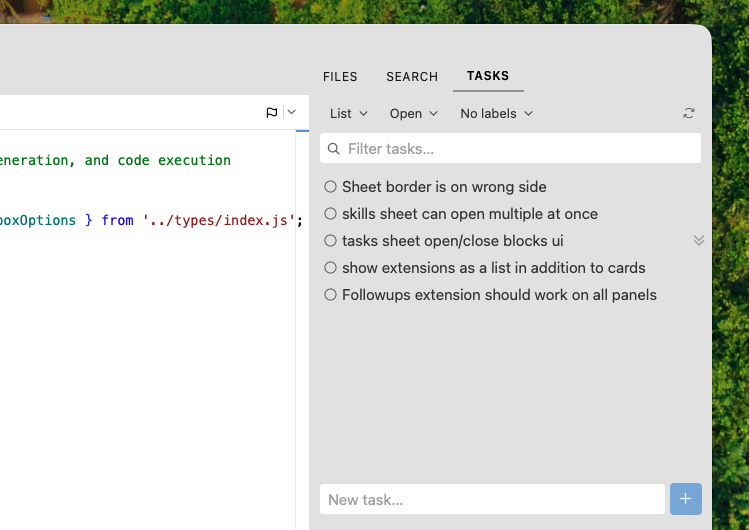
You know what you meant to do next. It's in a scratch file, or a sticky note, or a TODO you'll never grep for again. Putting it in Jira feels absurd — it's a note to yourself, not a ticket. So it stays in your head, and then it doesn't.
Tasks gives you the thing in between: a real list, per workspace, one keystroke from the code it's about. Type it in the box at the bottom of the panel and get back to work.
What you get
- A list per workspace, plus one that's just yours — open a repo, get its list. The personal list rides along in every workspace for the things that aren't about any one project.
- Capture in one line — the quick-add box is docked at the bottom of the panel, always there. Type, hit Enter, keep going. It always lands in the workspace you're looking at, so there's nothing to pick.
- Detail when you want it, not before — a row is one quiet line: status, title, priority. Hover for the rest. Click to open the full page — description, due date, labels, and a checklist of acceptance criteria — then hit Escape to get back to the list.
- Slice it however you think — group by list, status, or label; sort by creation order, recency, priority, or title; filter down to a lane or a label; search by title, label, or exact task id. The panel remembers your setup per workspace.
- Four lanes, not a workflow engine — To do, In progress, Blocked, Done. Enough to see what's stuck, not enough to need a manual.
- Your agent can write to it — every list is a plain JSONL file in a stable location. Point Claude Code or any other agent at it in one line of
AGENTS.mdand it can file its own follow-ups while it works. The panel picks up outside edits the moment they land. - Nothing leaves your machine — no account, no sync, no network. The extension requests zero permissions.
Where your tasks live
One newline-delimited JSON file per list, in the extension's own storage directory — outside every repo, so nothing ever shows up in git status:
~/.config/silo[-<identity>]/extension-storage/silo.tasks/
├── global/tasks.jsonl                      ← the personal list
└── workspaces/<workspaceId>/tasks.jsonl    ← one per workspace
Each line is one task:
{"v":1,"id":"t_ab12_00001x9k","title":"Ship the RFC","lane":"todo","priority":"high","rank":"000000000004","labels":["docs"],"description":"...","dueDate":"2026-09-15","acceptanceCriteria":[{"text":"tests green","done":false}],"createdAt":1756600000000,"updatedAt":1756600000000,"closedAt":null}
lane is one of todo | in_progress | blocked | done. A line the extension can't parse — a hand-edit typo, or a record from a newer Silo — is kept verbatim and written back untouched, never dropped; a quiet notice names the file so you can fix it.
Handing the list to an agent
Add one line to your repo's AGENTS.md:
Task list: read/append tasks as NDJSON at
~/.config/silo/extension-storage/silo.tasks/workspaces/<id>/tasks.jsonl
(one JSON object per line, keep the `v` and `rank` fields).
Every write the extension makes is compare-and-swap — it re-checks the file right before replacing it and re-applies rather than clobbering someone else's write. The window isn't quite zero: a write landing inside the final check→rename gap is still lost. Fine for a task list; if you're scripting heavy concurrent appends, expect the occasional lost line.
Commands
| Command | Does |
|---|---|
silo.tasks.newInWorkspace |
New task in the current workspace's list |
silo.tasks.refresh |
Reload every list from disk |
Both run usefully with no arguments, so either can take a keyboard shortcut — assign them in Settings → Keyboard Shortcuts (search "Tasks"). Given a title, newInWorkspace creates the task outright and hands it back, which is what makes it worth calling from another extension or an agent; with no title it reveals the panel and drops the caret in quick-add.
Requirements
Silo 0.65 or newer.
Permissions
None. Tasks are stored locally in the extension's own storage and nothing leaves your machine.
Installing
From a GitHub Release
- Go to Releases.
- Right-click the
.tgzasset → Copy link address. - In Silo: Settings → Extensions, paste the URL and click Install.
From source
git clone https://github.com/silo-code/silo-extensions
cd silo-extensions/tasks
npm install
npm run build
Then in Silo: Settings → Extensions → Install from folder, point at this directory.
Building
npm install
npm run build        # one-shot, esbuild → dist/index.js
npm run build:watch  # watch mode
npm run typecheck
npm test             # unit tests
Phase 1 of RFC 0031; the proposal lives in the main silo-code/silo repo.
src/model/ and src/lib/ are pure and import the SDK for types only, so the unit tests never load the SDK runtime. src/providers/ holds the JSONL store, src/ui/ the React components, and src/index.ts is wiring: registrations, commands, and the panel.
Two surfaces are built but disabled
RFC 0031's phase 2 added two aggregating surfaces over the same source set, and both are switched off for the first public release — they need more work before they go in front of users:
- the Navigator's cross-workspace Tasks view, with its own header controls, which hands a picked task to the Tasks app; and
- the Tasks app sheet — every open workspace's list in a dock-anchored, non-modal sheet with multiline rows, a composer with a list picker, and batch editing.
NAVIGATOR_VIEW_ENABLED and TASKS_APP_ENABLED in src/index.ts are both false, so the view and its three "navigator"-surface toolbar items are not registered, and neither are silo.tasks.open / silo.tasks.newInApp — the only two entry points to the sheet, which is why gating those commands is what turns the app off. The code behind both (ui/CrossTasksView.tsx, ui/TasksAppSheet.tsx, the CROSS_SCOPE / SHEET_SCOPE prefs, lib/menus.ts's viewMenu, commands.openApp) stays in the build and under test; flipping the flags brings each back. Turn the app on before the view — the view's rows click into the sheet.
Dependencies
This extension depends on RFC 0032's ctx.storage.globalDir() / workspaceDir() and the ctx.files own-dir sandbox lift; on ctx.storage.workspaceDirs() for the (disabled) cross-workspace surfaces, which resolves a storage directory for every open workspace in one call; and on NavigatorViewProps.panelId, which is what lets the Navigator view anchor the Tasks app sheet to its own column. Those land in @silo-code/sdk 0.46.0 and Silo 0.65.0 — the SDK devDependency and silo.engine pins.
silo.engine is informational (the host does not enforce it), so the sheet degrades rather than breaking on an older app: without panelId it anchors to the Tasks side panel, which is where it opened before this shipped.
Versions
| Version | Published | Permissions | Build | sha256 |
|---|---|---|---|---|
| v0.1.1 | 2026-10-18 | none | — | 76aa9d73f39a… |