
Skills Manager
silo.skills-manager
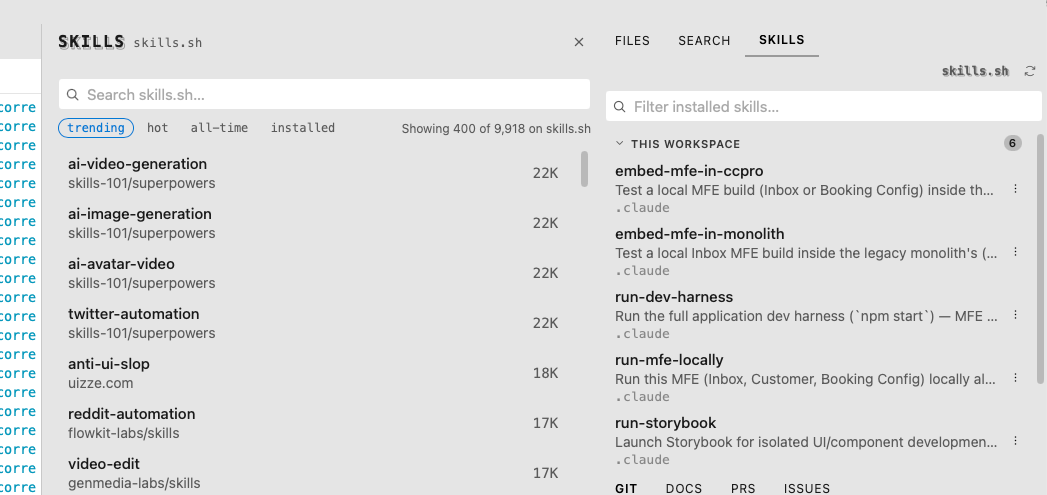
Agent Skills side panel — inventory of project + user installs, with a dock-anchored sheet to browse and install from skills.sh.
Skills Manager
A Silo extension for Agent Skills — see what's installed in the current workspace at a glance, then search, install, and remove more from skills.sh without ever leaving the editor.
What you get
A Skills panel — every skill installed in the current workspace and your user scope, grouped and filterable, so you always know what's already available to your agents without digging through
.claude/skillsfolders by handBrowse skills.sh from a dock sheet — trending / hot / all-time / installed, or search across skills.sh's full catalog, without a browser tab pulling you out of Silo
Rich detail pages — install counts, an
Officialbadge for maintainer-published skills, and a full summary before you commit to installing anything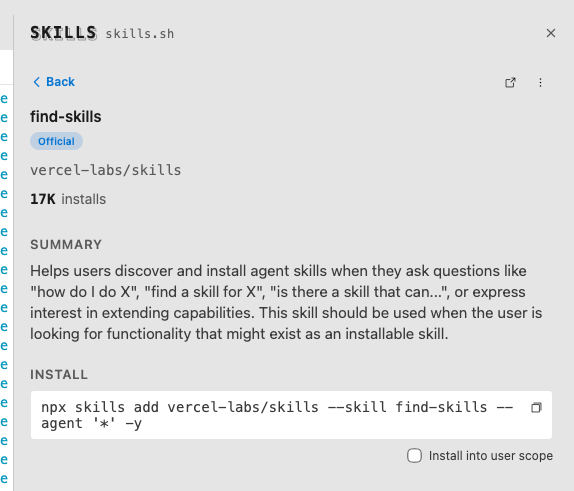
One-click install, project or user scope — copies (and can run) the exact
npx skills addcommand for you, with a checkbox to target user scope instead of the current workspaceUninstall the same way — no dropping to a terminal to remember the right flags
Confirm once, skip it forever — install/uninstall prompts have a "Don't show this again" checkbox
Live-updating inventory — the panel watches your skill root directories, so installing or removing a skill anywhere (even outside Silo) shows up immediately
Commands
| Command | Action |
|---|---|
silo.skills-manager.reveal |
Show the Skills panel |
silo.skills-manager.browse |
Show the panel and open Browse |
Requirements
Silo 0.53.0 or newer — this extension depends on three ctx surfaces added in that release (RFC 0029): ctx.layout.openPanelSheet, ctx.ui.confirmWithDontShowAgain, and ctx.system.homeDir().
Permissions
fs:read— scanning project/user skill directories and readingSKILL.mdfrontmatternetwork— fetching skill listings and descriptions from skills.sh
Installing
From a GitHub Release
- Go to Releases.
- Right-click the
.tgzasset → Copy link address. - In Silo: Settings → Extensions, paste the URL and click Install.
From source
git clone https://github.com/silo-code/silo-extensions
cd silo-extensions/skills-manager
npm install
npm run build
Then in Silo: Settings → Extensions → Install from folder, point at this directory.
Building
npm install
npm run build        # one-shot
npm run build:watch  # watch mode
npm test             # unit tests
Versions
| Version | Published | Permissions | Build | sha256 |
|---|---|---|---|---|
| v0.1.2 | 2026-08-31 | fs:read, network | — | 369a03dae394… |
| v0.1.1 | 2026-08-27 | fs:read, network | — | b0a472d3121a… |