
Agent Monitor
silo.agent-monitor
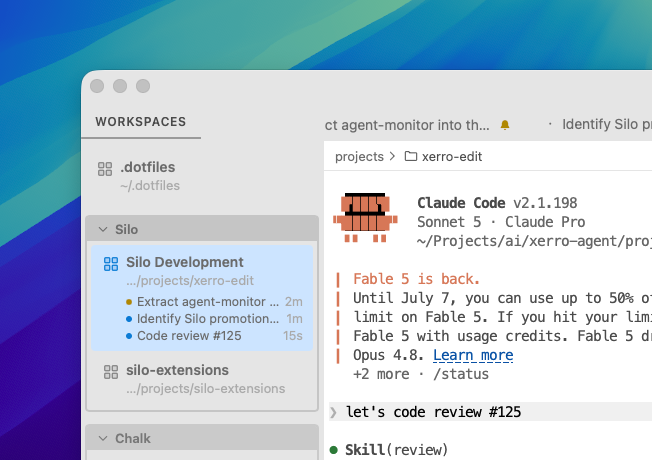
At-a-glance agent status in the Workspaces panel: rows for coding agents that are working or finished and need attention, cleared when you view the terminal.
Agent Monitor
A Silo extension that keeps track of every coding agent running in your terminals — so you always know which ones are working, which finished, and which are waiting on you — without tabbing through every terminal to check.
What you get
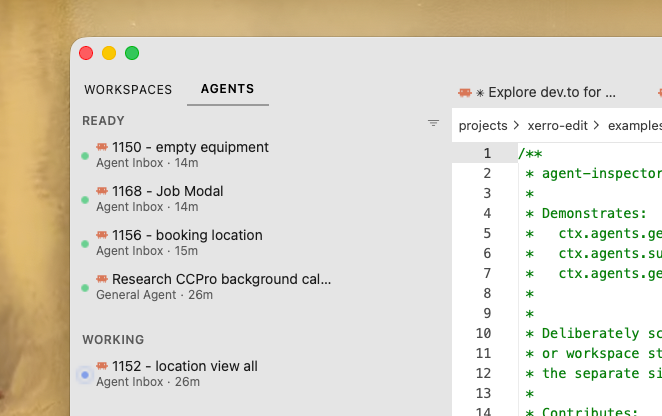
- An Agents view in the Navigator — listing every agent terminal across every workspace. View by in the Navigator header switches between three ways to read it: Recent (the default) — one flat, most-recently-changed-first list, with rows you can drag to reorder (drag from the grip that appears on hover) to pin the ones you care about in place; Status — sectioned into Ready / Working / Idle; Workspace — one heading per workspace. Click a row to jump straight to that terminal, whichever workspace it's in. It's a Navigator view rather than a second side panel, so there's still one place to navigate from
- "N+ hours old" heading — split long-idle agents out into their own heading once they've sat that long (on by default, 4 hours, both configurable — or turn it off — in Settings); it starts collapsed and reveals its rows on hover, opens by default when nothing else is running, and its rows aren't drag-reorderable in the Recent view
- Agent icons — each row (and the terminal tab itself) can show the agent's own brand icon — Claude Code, Cursor, Codex, GitHub Copilot, Grok — in color or a single neutral tone
- Status rows in the Workspaces panel — each terminal running an agent gets a row while it's busy (with elapsed time), once it finishes and needs your attention, or if it errors out
- Terminal tab badges — a spinner, check, warning, or error glyph decorates the tab itself, so status is visible even with the side panel closed
- Sticky "needs attention" — a finished agent stays flagged until you actually view that terminal, so nothing gets missed in a stack of background sessions
- Survives restarts — state and elapsed time (including how long a finished agent has been idle, shown in the Agents view) are restored across app restarts, and a restored row is marked "(unconfirmed)" if the gap since last seen is long enough that the agent may have finished without being observed
- Dead-session recovery — if a terminal's agent backend is confirmed gone after an unclean shutdown, its tab shows a warning and (when Silo could resolve one) a copy-pasteable
--resumehint right in the tooltip - Sound — an optional chime whenever an agent stops working, whether or not you're watching its terminal
- Configurable — a Settings page to choose what viewing a finished terminal does (acknowledge, acknowledge + hide its row, or leave it), the Agents view's icon style, whether/when it splits off the "N+ hours old" heading, and the notification sound
Supported agents
Since Silo 0.39, agent detection is done by the host and exposed to extensions through the ctx.agents API — this extension is a thin view over that shared state, so there's nothing to detect or configure per-agent here. Silo recognizes Claude Code, Cursor Agent, Codex CLI, GitHub Copilot CLI, and anything with terminal shell integration (e.g. pi), including agents typed into a plain shell. See Silo's own Settings → Agents page for the authoritative list and detection details.
Requirements
Silo 0.42.0 or newer (for the ctx.registerNavigatorView API; ctx.agents landed in 0.39).
Permissions
None — the extension only reads host-computed agent state and workspace/terminal titles, all exposed through the SDK without any capability grant.
Installing
From a GitHub Release
- Go to Releases.
- Right-click the
.tgzasset → Copy link address. - In Silo: Settings → Extensions, paste the URL and click Install.
From source
git clone https://github.com/silo-code/silo-extensions
cd silo-extensions/agent-monitor
npm install
npm run build
Then in Silo: Settings → Extensions → Install from folder, point at this directory.
Building
npm install
npm run build        # one-shot
npm run build:watch  # watch mode
npm test             # unit tests
Versions
| Version | Published | Permissions | Build | sha256 |
|---|---|---|---|---|
| v0.2.11 | 2026-08-27 | none | — | 92bf0bc074ac… |
| v0.2.10 | 2026-08-24 | none | — | 472bd1cdea69… |
| v0.2.9 | 2026-08-21 | none | — | 5ef013b1bda0… |
| v0.2.8 | 2026-08-21 | none | — | 3ef03b669efe… |
| v0.2.7 | 2026-08-17 | none | — | 166d579488ae… |
| v0.2.6 | 2026-08-14 | none | — | d9b003cd7b6c… |
| v0.2.5 | 2026-08-09 | none | — | be08640f994d… |
| v0.2.4 | 2026-08-07 | none | — | 6e780434a332… |
| v0.2.3 | 2026-08-05 | none | — | a13fa820e475… |
| v0.2.2 | 2026-08-04 | none | — | 4230edacbd9f… |
| v0.2.1 | 2026-07-31 | none | — | 9ddaa800db0b… |
| v0.1.9 | 2026-07-31 | none | — | 892a4a6a7525… |
| v0.1.8 | 2026-07-21 | none | — | 56c02a6edef4… |
| v0.1.7 | 2026-07-19 | none | — | 129870a235a7… |
| v0.1.6 | 2026-07-18 | none | — | d9c5c4fcbc25… |
| v0.1.5 | 2026-07-18 | none | — | 9f1ed27ed299… |
| v0.1.4 | 2026-07-16 | none | — | 4981924e8752… |
| v0.1.3 | 2026-07-16 | none | — | 5af18acf22d5… |
| v0.1.2 | 2026-07-14 | none | — | bba065b95661… |
| v0.1.1 | 2026-07-08 | none | — | c1a2219f800d… |